
NAT Configure on IR900
-

-
Sol.Sun 这家伙很懒,还没有设置简介
0 人点赞了该文章 · 5008 浏览
1. Introduction
Network Address Translation (NAT) simplifies and conserves IP addresses. It enables private IP networks to connect to the Internet using unregistered IP addresses (in the private address space specified in RFC 1918). NAT operates on a router, usually connecting two networks together, and is used to translate the private addresses in the internal network into legal routable addresses, before packets are forwarded to another network, because ISPs will not route RFC 1918 addresses. NAT offers the dual functions of security and address conservation, and is typically implemented in remote-access environments at the edge of the network where an enterprise connects to its ISP.
2. Configure NAT on IR900
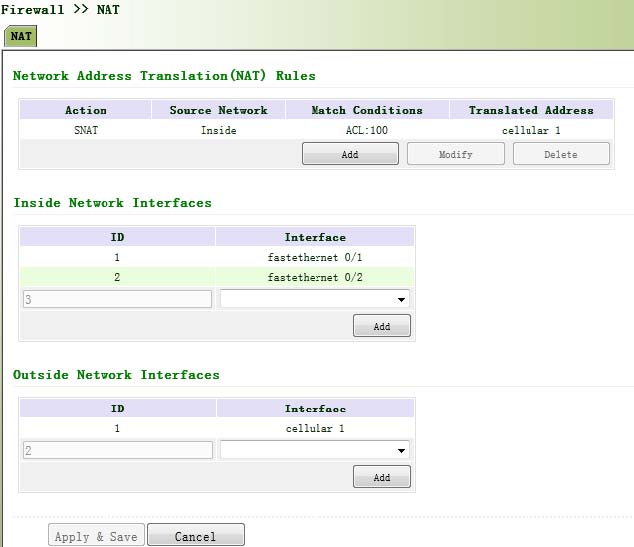
From navigation panel, select Firewall>>NAT, then enter “NAT” page, as shown below.
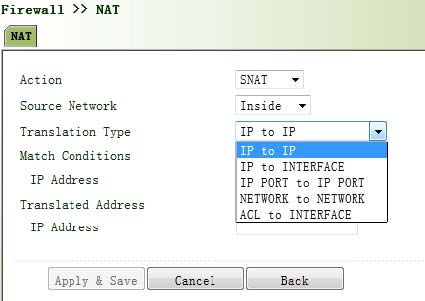
 Click <Add> to add new NAT rules, as shown below.
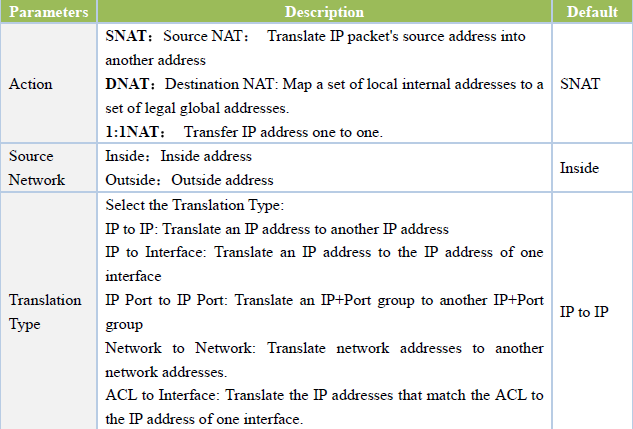
 Page description is shown below:
 3. Examples
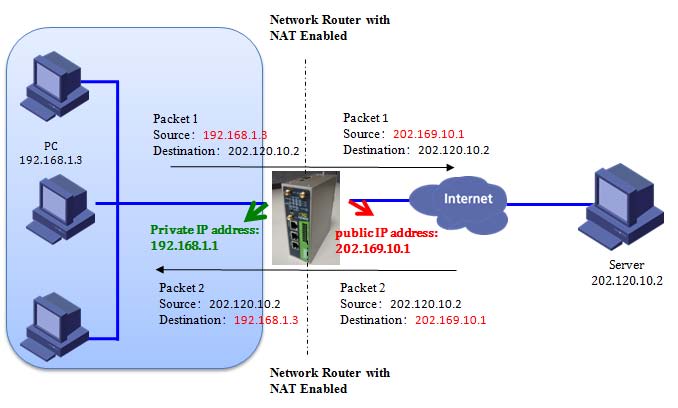
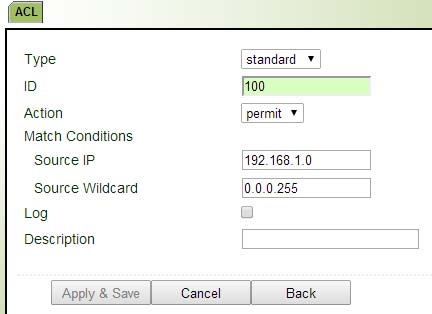
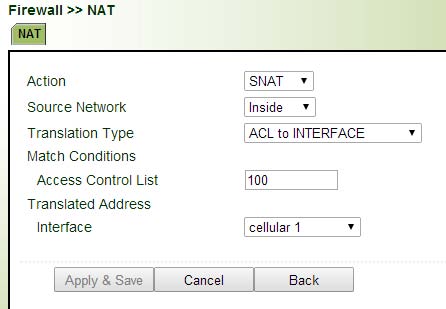
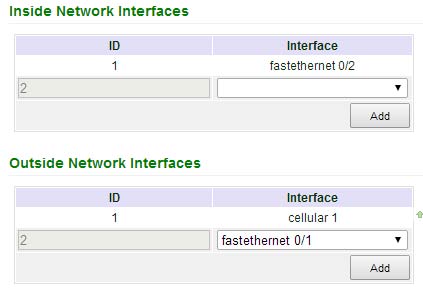
Next we take two examples to explain the NAT function. Application Case 1- SNAT: SNAT allows IR900 to act as an Internet gateway for internal LAN clients by translating the clients' internal network IP Addresses into a public IP Address on IR900. Network topology as the following show. When the PCs in the LAN nework (192.168.1.0/24)need to access internet, IR900 will translate their source IP address to the IP address of one interface on IR900.
3. Examples
Next we take two examples to explain the NAT function. Application Case 1- SNAT: SNAT allows IR900 to act as an Internet gateway for internal LAN clients by translating the clients' internal network IP Addresses into a public IP Address on IR900. Network topology as the following show. When the PCs in the LAN nework (192.168.1.0/24)need to access internet, IR900 will translate their source IP address to the IP address of one interface on IR900.
 Configure on IR900: Step 1: Configure ACL;
 Step 2: Configure NAT;
 Step 3: Define inside and outside interface;
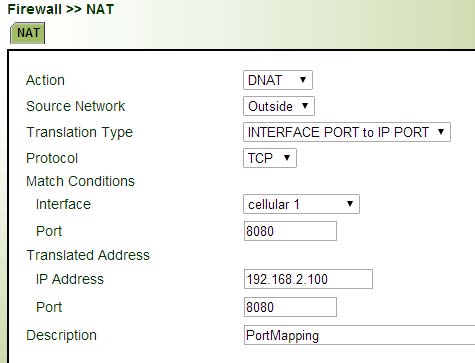
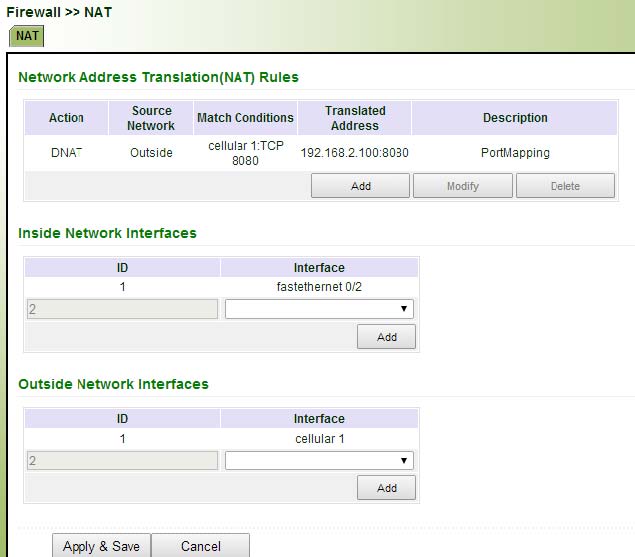
 Application Case 2- DNAT(Port Mapping/Forwarding):
Port mapping/forwarding allows remote computers (for example, computers on the Internet) to connect to a specific computer or service within a private local-area network (LAN). As the following show, Any device which is capable of reaching internet can access remote service (192.168.2.100:8000) via port mapping .
Application Case 2- DNAT(Port Mapping/Forwarding):
Port mapping/forwarding allows remote computers (for example, computers on the Internet) to connect to a specific computer or service within a private local-area network (LAN). As the following show, Any device which is capable of reaching internet can access remote service (192.168.2.100:8000) via port mapping .
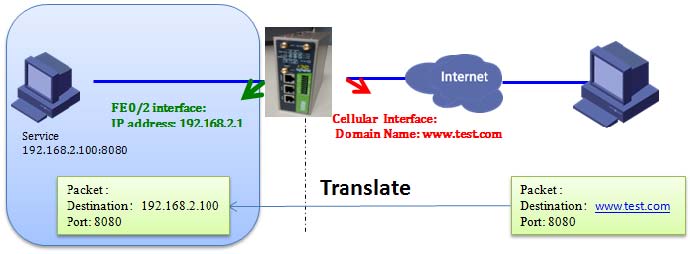 Configure on IR900:
 Contact us
Copyright © 2011 InHand Networks, All rights reserved.
Tel: 86-10-64391099-8022
Fax: 86-10-64399872
Address: Wangjing Science Park, Road Lizezhonger, Chaoyang District, Beijing, P. R. C, 100102
Website: http://www.inhandnetworks.com
Email: info@inhandnetworks.com
Contact us
Copyright © 2011 InHand Networks, All rights reserved.
Tel: 86-10-64391099-8022
Fax: 86-10-64399872
Address: Wangjing Science Park, Road Lizezhonger, Chaoyang District, Beijing, P. R. C, 100102
Website: http://www.inhandnetworks.com
Email: info@inhandnetworks.com


全部 0条评论